Is It Safe to Connect Your Bank Account to Rivo? Plaid Access, Credentials, and Controls Explained
Understand what happens when you connect a bank account to Rivo, including Plaid permissions, credential handling, data use, money movement and custody
.png)
Connecting a bank account to any financial app requires a trust decision. With Rivo, that decision should not be reduced to one vague question such as, "Is Plaid safe?" You need to understand what data is shared, who handles bank credentials, how money movement is authorized, where Treasury holdings are custodied, which protections apply, and how to stop access.
The short answer is:
Bottom line: Connecting an existing checking account to Rivo can be a reasonable choice for an informed user, but no financial connection is risk-free. Rivo does not receive or store your online-banking credentials. Plaid handles the account connection, and the exact authentication method depends on your financial institution. You control whether to link, pause automation, cancel movements, disconnect the account, and request eligible data deletion.
The most important distinction is that bank-data access, money-movement authorization, and investment custody are separate layers. A read-only data connection does not mean the entire Rivo product is observation-only. Rivo uses account data to analyze cash flow, while separately authorized product settings allow eligible cash to move.
This guide explains each layer so you can decide whether the connection model, controls, and remaining risks fit your comfort level.
TL;DR
- Rivo connects to existing bank accounts through Plaid. You do not need to switch banks, move direct deposit, or rebuild bill pay.
- Rivo does not receive or store your online-banking username or password. Plaid's handling depends on the institution: OAuth connections use a bank-issued token, while some non-OAuth connections may require Plaid to handle credentials.
- The account-data connection provides balances, transactions, and account details used for cash-flow analysis. Money movement occurs only under separately configured Rivo automation and transfer settings.
- The privacy policy states that financial data is encrypted in transit and at rest, uses secure API connections, and is not sold or shared for advertising.
- Pausing automation, canceling the service, disconnecting Plaid access, and requesting data deletion are different actions. Deleting an app from your phone does not revoke an account connection.
- Treasury holdings are custodied through Jiko Securities, a registered broker-dealer and SIPC member. SIPC protection is not FDIC insurance and does not protect against market loss.
- The right decision depends on whether you understand the permissions shown during linking, use strong account security, review activity, and are comfortable with both fintech data access and short-duration Treasury investment risk.
Quick Answer: What Happens When You Connect Checking to Rivo?
The connection creates a data path that lets Rivo analyze the cash flow in your existing account. It does not replace that bank account.
"Connected" does not describe every permission
A connected app can have several permissions. One permission may allow account and transaction data to be read. Another authorization may support money movement. Identity verification and brokerage onboarding involve additional data.
Read the actual consent screens. Do not infer the full permission set from the word "connected."
Safety is a stack, not a badge
The security of the system depends on:
- your bank login and device,
- the bank's connection method,
- Plaid's data-sharing layer,
- the Rivo application and controls,
- the transfer rails,
- Jiko's brokerage and banking infrastructure,
- and your own monitoring.
No single logo eliminates every risk in that stack.
.svg)
Why Rivo Needs a Bank Connection
Rivo needs current account data to distinguish operating cash from potentially idle cash.
The privacy policy identifies balances, transactions, and account details as relevant financial data collected when a bank account is connected through Plaid. Those records help the product evaluate:
- paycheck and income patterns,
- recurring bills,
- card and loan payments,
- transfers,
- ordinary spending,
- checking-balance movement,
- and the amount above the minimum balance you choose.
A static balance is not enough
In an illustrative example, if checking shows $30,000 today, that number alone cannot tell the product whether $20,000 is idle or whether a mortgage, credit-card payment, tax bill, and tuition withdrawal are approaching.
The transaction pattern provides context. The user-set floor provides the boundary.
Rivo is not a budgeting app
The connection is not used merely to categorize coffee, groceries, or entertainment. The product uses cash-flow information to determine whether eligible cash can leave checking and when money may need to return before expected obligations.
For the complete operating loop, read How Does Rivo Autopilot Work?.
What Financial Data Rivo Receives
The data set can include:
The privacy policy also describes account information, identity-verification data, communication data, device information, usage data, cookies, and third-party information.
The exact data can vary
Plaid explains that the data available depends on the products used, the financial institution, and the accounts selected. In some connection methods, a single bank login can expose multiple eligible accounts for selection. Review the institution and account list shown before approving the connection.
The Plaid End User Privacy Policy provides the broader list of data Plaid may collect or derive across its products. That list is broader than a claim about the specific data Rivo uses in every case.
Identity verification is separate from transaction analysis
Opening or using a regulated financial product may require identity verification. The information can include a government-issued ID and other details needed for know-your-customer or anti-money-laundering checks.
Do not confuse that onboarding data with the transaction feed used to analyze checking cash flow.
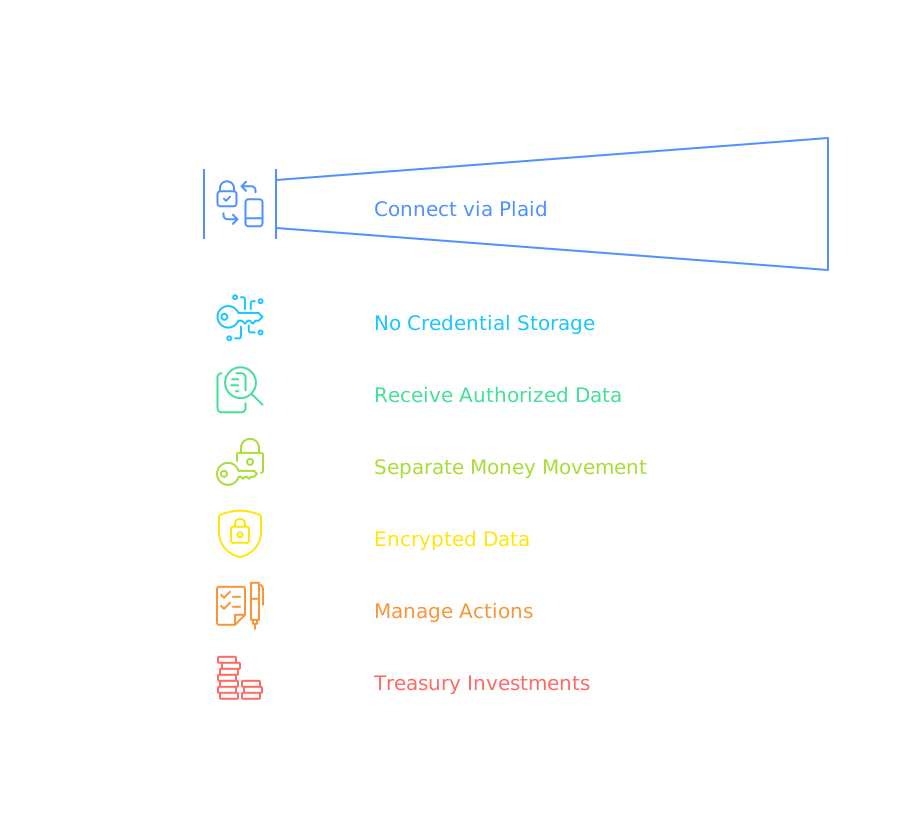
Does Rivo See or Store Your Bank Password?
Rivo does not receive, store, or have access to your online-banking credentials.
Plaid handles the connection to the financial institution. The exact credential path depends on how that institution integrates with Plaid.
OAuth connections keep credentials at the bank
With an OAuth connection, you authenticate directly with the financial institution. The bank then provides Plaid a secure, scoped token. Plaid describes this model in its OAuth guide: users grant access without directly sharing credentials with the third-party app.
Some Plaid connections can handle credentials
Not every institution uses the same connection method. Plaid's credential guidance explains that for some connections it may collect and store login credentials, while other institutions issue a security identifier or token.
The accurate statement is therefore:
Credential boundary: Rivo does not receive or store your bank credentials. Whether Plaid handles credentials or a bank-issued token depends on the financial institution's connection method.
That is more precise than claiming credentials are never stored anywhere in every Plaid flow.
What "Read-Only Access" Means
Read-only access describes the financial-data connection available to Rivo for analysis. It means the data connection is used to view authorized account information, not to edit your bank profile or change transactions already posted by the bank.
It does not mean Rivo is a read-only product.
Data access and transfer authorization are separate
Rivo uses the data layer to decide what appears eligible. Money movement then follows the settings and authorizations configured for the product.
Read-only does not eliminate privacy risk
Transaction history can reveal income, merchants, locations, medical payments, subscriptions, political donations, and household behavior. Data does not need editing permission to be sensitive.
Evaluate the connection based on both:
1. what actions it can support, and
2. what information it can reveal.
Does Connecting Rivo Let It Move Every Dollar?
No. Connecting the account does not mean every dollar is eligible for movement.
You configure a minimum checking threshold, often called the safe balance. Rivo analyzes cash flow and evaluates only cash above that floor after accounting for expected bills and spending.
The safe balance is a user control
AutoPilot currently supports earnings for one primary checking account, even if multiple accounts are linked for visibility.
A high floor is a valid security choice
A cautious user can begin with a larger minimum balance. That reduces the amount eligible to move while the product observes the account's real bill pattern.
The purpose of the floor is not to maximize yield on day one. It is to keep the operating account usable.
How to Review a Planned Movement
Rivo sends a movement email at 5 p.m. Pacific and allows manual cancellation until midnight.
That review window adds a human control between the cash-flow decision and the planned transfer.
What to check in the notice window
- Did a large card charge post today?
- Did payroll arrive late or for a different amount?
- Is a tax, tuition, travel, or repair payment coming?
- Did a transfer appear that the normal pattern would not predict?
- Does the remaining checking balance still feel adequate?
If the answer is unclear, cancel the movement, raise the floor, or pause automation.
Email access becomes part of account security
Because movement notices arrive by email, protect that email account with a strong unique password and multi-factor authentication. A compromised inbox can hide warnings or account-change messages.
Do not approve requests or follow links from unexpected messages without confirming the domain and opening the app directly.
The Security Controls That Protect Rivo Data
The privacy policy describes:
- encryption in transit and at rest,
- secure API connections,
- role-based access controls,
- multi-factor authentication for sensitive actions,
- fraud detection,
- and security monitoring.
The product site also identifies 256-bit encryption and SOC 2-compliant infrastructure.
What SOC 2 does and does not prove
SOC 2 is an assurance framework used to evaluate controls at a service organization. The phrase "SOC 2-compliant infrastructure" is not the same as a promise that no breach, outage, employee mistake, phishing event, or vendor failure can occur.
Ask the practical questions:
- What part of the system is in scope?
- Is a current report available under appropriate confidentiality?
- Which service providers handle sensitive data?
- What happens when access is revoked?
- How are security incidents communicated?
Encryption does not solve every risk
Encryption can protect data in transit and at rest. It does not prevent:
- a user from approving a phishing prompt,
- an attacker from using a compromised email account,
- a weak reused password,
- authorized but misunderstood data sharing,
- or a user leaving an unused app connected.
Security controls reduce risk. They do not make informed user behavior optional.
Does Rivo Sell Your Personal Information?
The privacy policy states that personal information is not sold or shared for advertising purposes.
That does not mean data is never shared.
Service delivery requires limited sharing
The policy describes sharing under conditions such as:
This distinction matters:
Privacy distinction: "We do not sell personal information for advertising" is different from "no third party ever processes any data."
Financial automation cannot operate without regulated partners and infrastructure providers.
Review both Rivo and Plaid policies
The connection uses Plaid, so both companies' data practices matter. Review how Rivo handles data and Plaid's current privacy materials before linking.
Where Your Money Goes After It Leaves Checking
The Plaid connection does not custody money.
Eligible idle cash moves through the product's financial-partner structure and is invested in short-duration U.S. Treasury bills through Jiko Securities.
Rivo is the software layer
Jiko Securities is registered as a broker-dealer and is a member of FINRA and SIPC. Its Form CRS describes an online account for Treasury-bill investment strategies.
Custody risk is different from connection risk
A privacy concern asks who can see financial data.
A custody concern asks who holds cash and securities.
An investment concern asks whether the asset can lose value.
Answering one does not answer the others.
Are Treasury Holdings FDIC Insured?
No. Treasury bills are investments, not FDIC-insured bank deposits.
The FDIC lists U.S. Treasury bills, bonds, and notes among products not covered by deposit insurance. Treasury securities have a different risk and protection structure.
FDIC and SIPC protect different failures
SIPC explains that protection is up to $500,000, including up to $250,000 for cash held for securities transactions.
SIPC is not a cybersecurity warranty
SIPC is a brokerage-customer protection regime. It is not a blanket reimbursement promise for every scam, account takeover, bad investment decision, rate change, or loss from selling a Treasury bill before maturity.
Read Are Treasury Bills Safe for Short-Term Cash? for the full investment-risk analysis.
Can Treasury Bills Lose Value?
Short-duration Treasury bills carry standard fixed-income risks.
If held to maturity, the investor expects the stated maturity value, subject to the U.S. government's payment obligation. If sold before maturity, market conditions and transaction costs can affect the realized result.
Product security is not return certainty
A system can have strong data controls while the investment return still changes. A secure connection does not guarantee:
- a particular Treasury yield,
- a particular holding period,
- no early-sale cost,
- or no loss in realized value.
Keep urgent money in checking
Money needed for a same-day emergency, imminent wire, tax deadline, home closing, or uncertain large payment should remain in checking or another destination appropriate to the timing.
The safe balance should reflect liquidity needs before yield.
What Happens When You Pause, Cancel, Disconnect, or Delete?
These actions are not interchangeable.
Deleting the app is not enough
The CFPB advises consumers that deleting an app does not necessarily stop financial-data sharing. Revoke the connection directly.
Plaid also explains that disconnecting an app stops future data sharing but does not automatically delete data the app already collected.
Use both available control paths
To end a connection:
1. Pause or cancel Rivo automation.
2. Confirm the destination of any available funds.
3. Disconnect the bank account in Rivo.
4. Review the connection in Plaid Portal.
5. Submit deletion requests where appropriate.
6. Confirm that future data sharing has stopped.
Deleting Your Data
Depending on jurisdiction and applicable exceptions, users may request access, correction, portability, or deletion of personal information.
The privacy policy directs privacy requests to privacy@rivofi.com.
Some records must be retained
Financial companies and regulated partners can have legal, compliance, fraud-prevention, dispute, and recordkeeping duties. The privacy policy notes that identity-verification data may be retained for at least five years after account closure.
A deletion request therefore does not necessarily mean every record disappears immediately.
Plaid has a separate deletion path
Plaid Portal and the Plaid Privacy Request Form can be used to manage connections and request deletion from Plaid's systems, subject to stated exceptions.
Requesting deletion from Rivo does not automatically prove that a separate request has been completed at Plaid, and vice versa.
What to Check Before Linking
Use this pre-link checklist.
Open the bank from a trusted path
Start in the official Rivo app or website. When redirected to a bank, verify the domain or use the bank's official app.
Do not connect from an unsolicited email, text, direct message, or search advertisement without independently confirming the destination.
Read the institution-specific consent screen
The connection method and available data can differ by bank. The consent screen is more authoritative for that connection than a generic description of Plaid.
How Should You Secure the Connected Accounts?
Use defense in depth.
Protect the bank account
- Use a unique password.
- Enable the strongest multi-factor authentication the bank offers.
- Review sign-in alerts.
- Keep contact information current.
- Monitor connected-app permissions in the bank portal when available.
Protect Rivo and Plaid access
- Use unique credentials.
- Protect the email account receiving security and movement notices.
- Review new-device or account-change messages.
- Disconnect unused connections.
- Do not share one-time codes with anyone.
Monitor transactions and statements
The CFPB recommends reviewing statements and reporting an unrecognized transaction to the financial institution promptly in its guidance on sharing financial data.
Keep records of:
- movement notices,
- transfer confirmations,
- Treasury transaction confirmations,
- brokerage statements,
- withdrawal requests,
- and written support communications.
What to Do If Something Looks Wrong
Act based on the affected layer.
Do not rely on email alone
Open the official app, bank portal, or known website directly. A phishing message can imitate urgency, a movement notice, or a support request.
Preserve evidence
Save screenshots, dates, transaction identifiers, emails, and support-case numbers. Written records help each institution trace what occurred.
The Risks That Remain After Every Control
Controls reduce risk but cannot remove:
- outages,
- delayed data,
- model error,
- missed or changing bills,
- compromised user devices,
- phishing,
- service-provider incidents,
- bank or transfer delays,
- early Treasury sale outcomes,
- or legal and policy changes.
Availability risk matters
A secure service can still be unavailable. Keep enough checking cash for payments that cannot tolerate a delay.
Do not build a cash plan that assumes every transfer, data refresh, and sale will always complete instantly.
Prediction risk matters
Rivo can learn recurring patterns, but it cannot know every future decision. A home purchase, tuition payment, medical bill, tax payment, or family transfer may not appear in historical data.
Raise the minimum balance or pause automation when you know the future will differ from the past.
Who Fits the Bank-Connection Model
The model may fit a user who:
- already keeps meaningful excess cash in checking,
- wants to keep the current bank,
- understands the Plaid consent flow,
- is comfortable sharing authorized transaction data,
- will set a conservative minimum balance,
- understands that Treasury bills are investments,
- and will monitor notices and statements.
A trust-conscious user can start conservatively
You do not need to maximize movement immediately. Connect the intended account, choose a high floor, review the initial analysis, and confirm that controls behave as expected.
Trust should be earned through observable operation.
Product fit and security comfort are separate
Rivo can be economically relevant for a household while still failing that household's data-sharing comfort test.
Both conditions must be satisfied.
Who Should Not Connect Yet?
Wait when:
- you cannot identify the official connection flow,
- the permission screen is unclear,
- you do not understand where assets will be held,
- you need every dollar immediately available in checking,
- the safe balance is unknown,
- income or bills are undergoing major change,
- you cannot reliably monitor email and account activity,
- or you are uncomfortable with Plaid or brokerage-based cash management.
Do not proceed merely because the yield is attractive
Rate comparisons cannot answer:
- whether you accept data sharing,
- whether the liquidity model fits,
- whether the investment risk fits,
- or whether you will maintain the controls.
Security and product suitability come before yield.
Ask support before connecting
Use support to clarify:
- the accounts and data to be linked,
- the authentication method,
- the transfer authorization,
- the custody structure,
- the cancellation process,
- the withdrawal process,
- and the data-deletion process.
An unresolved trust question is a valid reason to wait.
How This Differs From Replacing Your Bank
Rivo is an overlay on the existing checking account, not a replacement checking account.
You keep:
- the current bank relationship,
- direct deposit,
- debit card,
- checks,
- bill pay,
- and the checking transaction hub.
Rivo adds:
- an authorized data connection,
- cash-flow analysis,
- a user-set checking floor,
- automated cash movement,
- and Treasury-bill investment through Jiko Securities.
Keeping the bank reduces migration work
You do not have to move every household payment merely to address idle cash.
But keeping the bank does not mean nothing changes. You are adding third-party data access, transfer activity, and a brokerage relationship.
Read Does Rivo Replace Your Bank? for the complete account-structure comparison.
The Final Safety Decision
Use five separate yes-or-no tests.
If any answer is no, stop and resolve it before connecting.
The most accurate answer is conditional
It is not accurate to say that connecting any financial app is perfectly safe. It is also not accurate to treat every connection as equivalent.
The practical question is whether the architecture is understandable, the permissions are limited to the service you want, the partners and protections are clear, the controls are usable, and the remaining risks fit your circumstances.
Final Recommendation
Connect your checking account to Rivo only after you understand all four layers:
1. Data access: Plaid connects authorized account information. Rivo does not receive or store your bank credentials, but Plaid's credential handling varies by institution and authentication method.
2. Money movement: The read-only data feed and the authorization to move money are separate. Configure a conservative minimum balance and review planned movements.
3. Custody and investment: Rivo is the software layer. Treasury investment and brokerage services are provided through Jiko Securities. T-bills are investments, not FDIC-insured deposits.
4. Exit controls: Pausing, canceling, disconnecting, and deleting data are separate actions. Use the appropriate Rivo, Plaid, bank, and privacy controls.
For an informed user who wants to keep an existing bank and automate genuinely idle cash, the connection model can be reasonable. For a user who cannot verify permissions, does not understand the custody structure, needs immediate access to every dollar, or is uncomfortable sharing transaction data, waiting is the better decision.
Security is not a one-time onboarding checkbox. Keep the checking floor current, monitor notices and statements, review connected apps, and disconnect access you no longer use.
FAQ
Does Rivo receive my online-banking password?
No. Rivo does not receive or store your online-banking credentials. At OAuth-enabled institutions, authentication occurs directly with the bank and a token is issued. In other Plaid connection methods, Plaid may handle credentials when required by the institution.
Is the Rivo bank connection read-only?
The account-data connection available to Rivo is read-only and is used for cash-flow analysis. The full product can also move eligible cash under separately configured automation and transfer authorizations. Read-only data access should not be interpreted as "the product can never transfer money."
What data can Rivo see after I connect?
Authorized data can include balances, transactions, account details, and related information needed to provide the service. The exact scope depends on the institution, selected accounts, consent screen, and Plaid products involved.
Can I disconnect my bank account?
Yes. You can stop Rivo automation and disconnect the account. You can also review and revoke supported Plaid connections through Plaid Portal. Disconnecting stops future sharing through that connection but does not automatically delete all previously collected records.
Are my Rivo Treasury holdings FDIC insured?
No. Treasury bills are investments and are not FDIC-insured deposits. Eligible customer securities and cash at Jiko Securities are subject to SIPC protection limits and conditions. SIPC does not protect against market loss.
What should I do before connecting?
Verify the official app and domain, review the institution-specific consent screen, select only intended accounts, understand the minimum-balance and transfer settings, review the privacy and partner disclosures, secure your bank and email accounts, and confirm how to pause, disconnect, withdraw, and request data deletion.
Related Rivo Reading
- To understand the product before evaluating the connection, read What Is Rivo?.
- To see the complete setup and money-movement workflow, read How Does Rivo Autopilot Work?.
- To understand custody, account ownership, and access if the software company becomes unavailable, read What Happens to Your Money if Rivo Shuts Down?.
- To understand what changes when Rivo works with your existing account, read Does Rivo Replace Your Bank?.
- To separate connection security from investment risk, read Are Treasury Bills Safe for Short-Term Cash?.

This article is educational and is not financial, investment, tax, accounting, or legal advice.
Yield rate reflects the 4-week T-bill rate when held to maturity. Rate does not include fees. Rates are subject to change. Minimum balance of $100 is required to earn the stated rate.
Rivo is a fintech company, not a bank. Banking services provided by Jiko Bank, a division of Mid-Central National Bank. Jiko Group, Inc. and its affiliates do not provide legal, tax, or accounting advice. You should consult your legal and/or tax advisors before making any financial decisions. This material is not intended as a recommendation, offer or solicitation for the purchase or sale of any security or investment strategy. See FINRA BrokerCheck, Jiko U.S. Treasuries Risk Disclosures and Jiko Securities Inc. Form CRS.
Investments in T-bills: Not FDIC Insured - No Bank Guarantee - May Lose Value. All U.S. treasury investments and investment advisory services provided by Jiko Securities, Inc., a registered broker-dealer, member FINRA and SIPC. Securities in your account are protected up to $500,000. For details, please see www.sipc.org.

Shalu Yadav is Rivo's SEO/GEO Expert, bringing over 10 years of experience in making financial content discoverable across both classic search and generative AI platforms.
Follow on LinkedInGet Rivo Updates
Product news, money insights, and company updates.